How to Develop iOS Apps on Windows
In the past many developers have been discouraged from building iOS apps primarily due to the system requirements. The common notion is that if you do not own a Mac Book, you cannot develop iOS apps. The main issue that holds you from iOS app development in Windows was the Xcode, the Integrated Development Environment (IDE) we use to design and develop an iOS app. Xcode is only compatible with Mac OS. However, with advancements in developer tools, it is now certainly possible to develop iOS apps on Windows.
How to Develop iOS Apps on Windows
Windows can cover coding, prototyping, source control, and remote workflows for an iOS project. Apple-platform builds, signing, and device testing still depend on an Apple-supported toolchain such as Xcode, so plan for an available Mac or an approved remote build service.
- Use an Apple-supported Mac or an approved remote build service for the Xcode stages.
- Rent a Mac in the cloud and use RDP to access your Mac in the cloud
- Code with a Swift Sandbox
- Build using React Native
- For maintained cross-platform code, review the current .NET/.NET MAUI migration path rather than starting a new Xamarin project.
- Keep the Apple-only build, signing, and device-testing steps on an Apple-supported environment.
The workflow and latency depend on the chosen remote or hosted environment. Cross-platform frameworks can help with shared code, but they do not remove Apple signing, SDK, or device-testing requirements. Validate the complete build path before committing to a framework.

Unity is essentially known as a game development engine that can be used on Android, iOS, Windows, and many other platforms. But its rapid development and powerful features also make it a good choice for building non-gaming apps and to make iOS apps on Windows. Unity's "Cloud Build" feature supports iOS app development on Windows in simple steps.
By registering as an Apple developer and joining the unity cloud build, it is easy to set up, create, and build iOS projects. With a free to use editor for development and distribution, it is possible to completely build iOS on Windows. While installing Unity, don't skip to check "iOS deployment" and your Unity (on Windows) will be ready to build an Xcode project. Next, just assign this Xcode project on a Mac with Xcode installed and you will be ready to compile the project to be run on your iOS device.
If a Mac is unavailable, separate the work that can happen on Windows from the Apple-only build and signing steps. Treat remote or hosted Mac access as an operational dependency and verify its current terms, security, and reliability.
However, before you start iOS app development on Windows, it is extremely important to come up with an iOS app design that you can test and get feedback from users and internal stakeholders. Remember the popular 80-20 rule which says that 80% of your time should be spent on design and only 20% on coding.
Would you interested in iOS development? Click and learn more about the Everything You Need to Know about iOS Development.
The Best Tool for iOS App Design
Undoubtedly, it is extremely important to choose a high-quality industry standard tool for designing an iOS app. Mockitt is your perfect choice. This fully cloud based tool, enables you to create wireframes and interactive prototypes with build-in widgets and templates. The design community has lauded this tool as an extremely designer friendly tool as it enables you to simply drag and drop widgets and icons and create a full-fledged prototype within minutes.
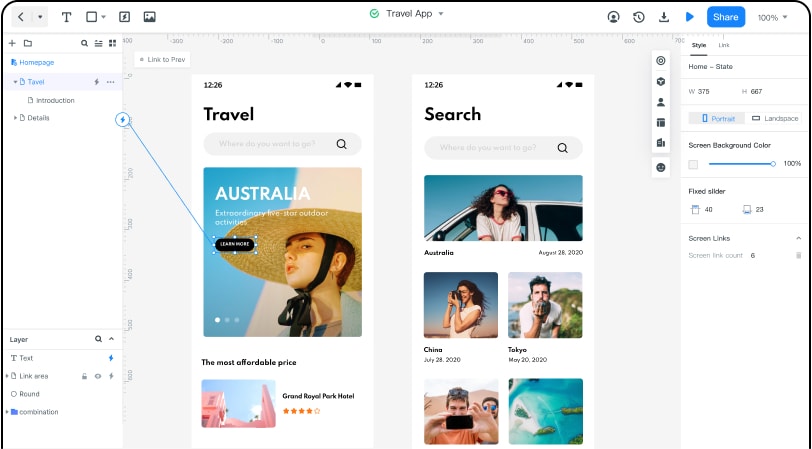
You can select elements from the Toolbar and the Libraries palette and place them onto the canvas to design your prototype easily and rapidly. You can arrange and connect components as you desire. Once your design is ready, it is likely that you will want to share it with your team to iterate further. Mockitt enables you to preview your prototypes on any device and share your prototypes with anyone or specific people with a single click. Of course, you can control the visibility of the project by managing the permissions.
As you or your development team sets out to develop iOS apps on Windows, they will continually refer to the design. Things can quickly get out of hand when a developer is expected to code by just looking at the design. Mockitt allows you to optimize the collaborative efforts of your design and development teams through Mockitt's browser-based inspect and export tools. Developers can easily generate the exact specifications and say good bye to interpretation based disconnects. Developers can obtain the required design resources such as annotations and cutting diagrams through Mockitt link and start programming.
Mockitt is an all-in-one prototyping tool that can meet the requirements of product managers, designers, and developers in product design and team collaboration. There is no need to purchase multiple tools to switch back and forth.
Mockitt has been established for several years now. It has been deeply involved in the field of product design collaboration and has served many well-known companies. The strong community also regularly contributes to the libraries of this tool. All of this makes the tool a preferred design utility. The number of users has now reached 1.9 million all over the world, which speaks volumes about the credibility of the tool as well.