Wireframe Tools for Linux: Browser, Native, and Offline Options
When creating a website in Linux, it is easier to use wireframe tools for Linux. They enhance your clients understanding regarding the workability of your proposed website or app more comprehensively. Wireframe tools on Linux lessen the room for error because they do not have to rely on imagination to understand suggested functions. Getting the right wireframe tool is important for the foundation of your team's design process. In this article, you will find the best tools considering that there is multiply available that offer different functionality levels. The list contains their pros and cons as well to help you in choosing wisely.
5 of the Best Wireframe Tools for Linux
1. Mockitt
The collaborative wireframing and prototyping tool, Mockitt, is the perfect fit for UX/UI designers. It can create a wireframe on web browsers, Linux, Windows, and Mac systems, alongside an interactive prototype for a website or mobile application.
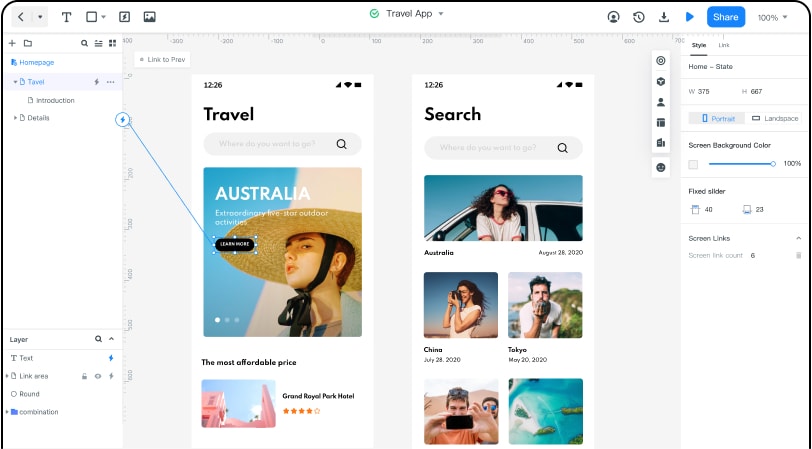
This Linux wireframe tool also supports online work. Using the Handoff feature, you have the power to smoothen the design-to-development workflow. If you wish to share specs and multi-platform code with fellow developers, you can do so by sharing a link and also export assets with a simple click.
Pros
- Easy to use and thus usable by beginners. You can drag-and-drop to finish your design.
- It has a great collaboration feature, which enables you to co-editing with your team members.
- There are plenty of resources including widgets, UI kits, icons, etc.
- There are many transitions, interactions, and animations you can use to make an interactive prototype.
- You can manage all your projects by folders and team owner can set specific permissions to each of the project.
- It is very friendly to use and even a beginner can start creating a prototype here.
- Share your prototypes through a simple link and others can preview your idea without registering Mockitt. You can also set a password to the link
2. UXPin
UXPin is a browser and desktop design tool whose Linux availability should be checked against its current system requirements. Confirm whether the workflow runs in a supported browser or requires a different operating system before committing a team project.
Check: browser support, component and prototype features, collaboration, export, and the current plan limits.
3. Figma
Figma is primarily used through a browser, so a Linux team should test the current browser requirements, file performance, and collaboration behavior on its target distribution. A browser workflow is different from a native Linux application and may require an internet connection.
Check: browser version, offline expectations, file permissions, prototype preview, and export options.
4. Moqups
Moqups is a browser-based option for wireframes, diagrams, and early prototypes. Verify the current browser support and plan limits before choosing it for a Linux workflow.
Check: project limits, sharing permissions, collaboration, export, and whether offline work is supported for the plan you use.
5. Marvel
Marvel can be evaluated as a browser-based wireframing and prototype option. Test the current Linux browser experience, sharing flow, and export before using it for a client project.
Check: browser support, project limits, prototype preview, user testing, and integrations available on the current plan.
Comparison among the Best Wireframe Tools for Linux
| Mockitt | UXPin | Figma | Moqups | Marvel | |
|---|---|---|---|---|---|
| Compatibility | Web-based, MacOS, Windows, Linux | Web-based, macOS, Windows | Web-based, macOS, Windows, Linux | Web-based | Web-based |
| Price | Basic is free Personal- $12.9 per month or $69 per year Team and Enterprise - $99 per year |
Basic is free Professional- $20 Premium -$24 per month for a single user Team- $79Enterprice- Custom |
Starter-$0 Professional $12 Organization -$45 per month for each editor |
Creative Team- $19 for 3 users and $6 per each other user. Personal- $13 Enterprise- Custom |
Basic is free Pro-$12 Team- $42 Team Plus_ $84 per month that is billed annually Team Plus_ $84 per month that is billed annually |
| Safe | Safe | Safe | Safe | Safe | Safe |
| Easy-to-use | YES | NO | YES | YES | YES |
| low, medium, and high fidelity | High fidelity | High fidelity | High fidelity | Low fidelity | High fidelity |